A secure wireless link
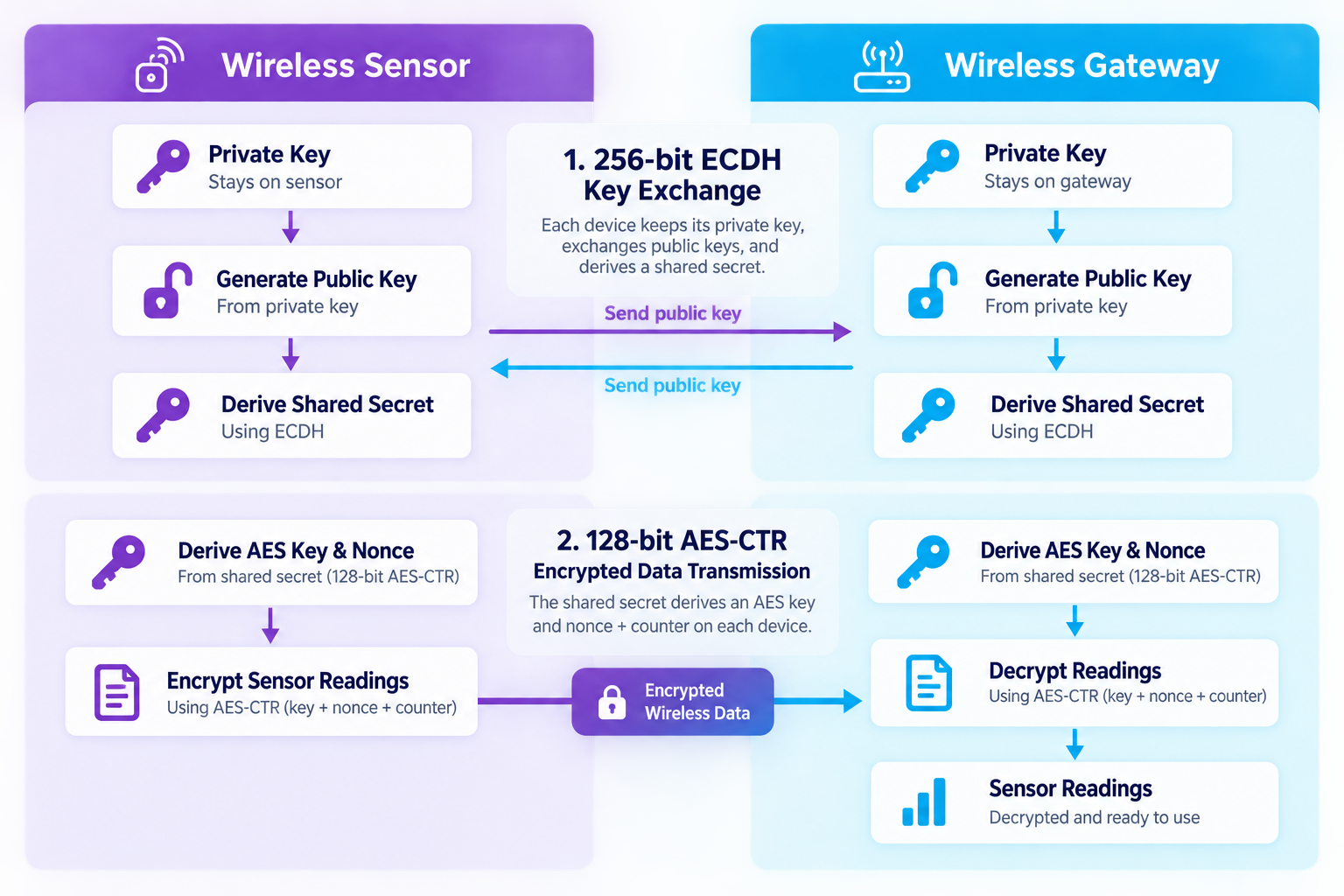
Monnit ALTA uses Encrypt-RF to protect communication between sensors and gateways. A 256-bit key exchange establishes a unique key for the device pair.
 Secure checkout
MONITORING SECURITY
From wireless measurements to account access, Monnit combines encryption and access controls to help keep your monitoring data protected from unauthorised access.
Monnit ALTA uses Encrypt-RF to protect communication between sensors and gateways. A 256-bit key exchange establishes a unique key for the device pair.
Sensor data is protected using 128-bit AES encryption. Someone nearby listening to the wireless signal should not be able to read the measurements without the appropriate key.
iMonnit administrators can choose the networks each user can see and the actions they can perform, including viewing history, exporting readings and changing settings.
HOW ENCRYPT-RF WORKS
In the ALTA scheme illustrated below, the sensor and gateway exchange public keys using elliptic-curve Diffie–Hellman (ECDH). Each combines its own private key with the other device’s public key to derive a shared secret. The private keys are not sent across the wireless link.
Give each team member their own iMonnit login and grant only the networks and permissions they need. Review access when responsibilities change, and remove users who no longer need it. iMonnit also uses two-factor authentication to add a second check when signing in.
Wireless encryption is one part of a secure monitoring system. Gateway connections, software, account permissions and any integrations also need to be configured correctly. Protect passwords and API credentials, keep supported firmware up to date, and review access to exported reports and alerts.
No connected system can promise that unauthorised access is impossible. These controls help reduce the risk; the protections available depend on your equipment, software and configuration.
Tell us where your sensors will be installed, who needs access and how you want to use the readings. We can help you select the equipment and identify the security information your IT team needs.
Talk to our team →